Saturday, April 14, 2007

Mac vs. Windows vs. Linux--Part 2

Today I will continue the series discussing, well actually over viewing the separate operating systems and in the final post I will discuss the positives and negatives of each system. Anyways, this post will overview Microsoft's operating systems:

Windows (XP and Vista)

Most of you run a version of Windows and those of you who run a different system are probably still familiar with it from using it in places such as
schools and libraries. Microsoft holds about 90% of the market when it comes to operating systems and most business, governments (local, state, and national), and universities choose Windows. Like Apple, Microsoft began in the 1970s (1975 to be exact) when the Personal Computer industry was just a fledgling industry. Microsoft's first entry into the business was with DOS (Disk Operating System) in 1981 which was popular until about 1995. Besides operating system's, Microsoft has created a popular gaming console, Xbox (and Xbox 360), and a claimed "iPod killer" Zune but has not lived up to its name (more Microsoft history can be found here; link) Windows XP was released in late 2001 and about three months ago, Windows Vista was released and will soon become the major operating system from Microsoft. I have decided to overview both systems because XP is still the dominant system as many of you have not switched to Vista, therefore I will probably go into more detail about Vista.

(Windows XP Desktop, a sight very familiar to all of you)

Windows XP was designed by Microsoft for general use in homes and at businesses. Like OS X, Windows XP utilizes a GUI for users to quickly and easily access the computers inner workings. Older versions of Windows' operating systems were very prone to crashing and not very reliable, XP fixed most of these problem with increased security and reliability. Inside XP, you will find a powerful system that allows users to do more than ever. Multiple users can quickly switch accounts in XP without closing any programs or logging off. Another great feature of XP is its Remote Desktop function which allows system administrators to fix a computer without having to visit it (that is, only if it has a software problem). Windows XP allows users to listen to all of their favorite music in Windows Media Player, while Windows Messenger allows users to chat with their friends and family all over the world (detailed XP overview can be found here). While XP does not come with a word processing software, Microsoft Office is a very powerful (and valuable) tool that allows users to create, share, and edit documents like essays, spreadsheets, and presentations. XP is a relatively stable system considering the amount of users it has but Vista has certainly increased stability and security.
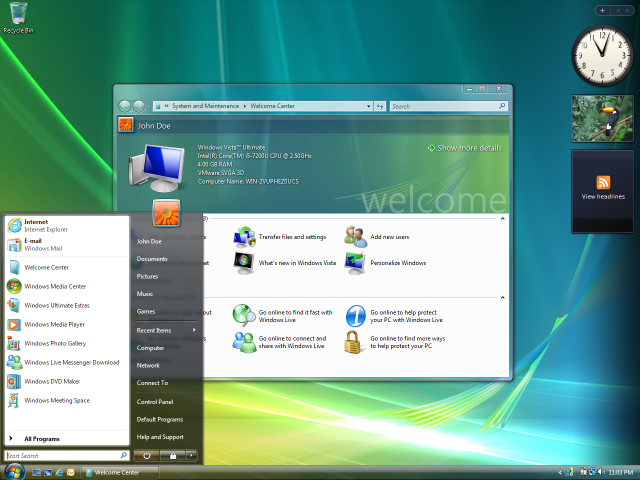
Windows Vista is similar in design to XP but has many enhancements ranging from security to visual appeal. Windows Aero, the new GUI, provides a more asthetically pleasing look to Windows and provides transparencies, live thumbnails, live icons, animations and eye candy. In Vista, there is a bundle of productivity and entertainment tools such as a Calendar, Address Book, DVD Maker, Web broswer (Internet Explorer), and Speech Recognition software. Vista also features Parental Controls which allow administrators (in this case, parents) to monitor what their children are doing and restrict access to certain programs and websites. A new Sidebar is present in Vista that allows users to personalize Gadgets that include clocks, weather reports, stock updates, news updates, and many others. Another very powerful and helpful tool in Vista is Shadow Copy, this program creates a daily backup of all changed files without the user ever having to worry about it. This is a useful tool in case something happens in the system and it crashes, the user still has all of their files available for use. There are many other features in Vista, but the ones I presented to you are the ones I think enhance usability in this system. A more detailed list and overview of Vista can be found here.

I hope this has given you a good overview of the old system, XP and the new system, Vista. If you notice any mistakes I made or think I should add something to the post, please let me know, I am open and willing to suggestions.

Next up I will cover the relatively unknown operating system (actually a kernel, which I'll discuss in the next post) Linux. The next post may be delayed until Sunday because I am participating in Big Event here at OU which is a campus wide community service event but I'll actually be in Oklahoma City at the Latino Community Development Agency. Thanks for reading my blog, I appreciate all of you who are back and I am especially thankful for all of you new readers. Let's hope for some good weather instead of all this cold! Have a wonderful weekend.

-Jamie

Friday, April 13, 2007

Mac vs. Windows vs. Linux--Part 1

Today, I will start the discussion about the three main operating systems that most people in the world run on. There will be four parts to this discussion, one post explaining each operating systems good and bad points and then my opinions on all three for the last post. I will try to remain objective about each system. We'll see how that goes but I think I can do it. I know this discussion has been going on since the inception of all of these operating systems but I'd like to give my readers an overview of the systems before any arguments take place. Also, I realize I will make mistakes when talking about certain systems, so please comment and let me know. First up:

Macintosh (or Apple, Inc.)

Oh, the wonderful multi-colored Apple. It has changed to a single color since the early days of Apple, Inc. (which is a very good thing) but the company has also recently changed its focus. Apple Computer began by just selling Personal Computers in 1977. I will spare you from the long history of Apple, but if you would like to find out more check out this Wikipedia page (link). Apple has been innovating the Personal Computer industry for a long time and it is no doubt that many great things have come from the Computer. In a recent "top 10 best tech products of all time" list (link), Apple had two products on the list: the Apple II and the iPod. The Apple II was the Personal Computer that "ignited the industy" and theres no need to explain the iPod. After taking many shots at branching out from the Personal Computer industry, in 2001 Apple inserted itself into the portable music player market. Now that you know some of what Apple has done in the last couple of decades, let me tell you some of the specifics about its newest (with the next version coming out this summer) operating system: OS X .


This is the OS X Desktop, this picture is featuring the dashboard widgets that allow the user to quickly check stock quotes, weather, the time, and many other things (link to Dashboard widgets). The Graphic User Interface (GUI), which allows people to interact with computers with visual icons and other graphical elements (most of you probably use this everyday on your computers; Wikipedia link), on Macs is very friendly to users and provides an uncluttered and simple desktop space. OS X, has a number of tools to enhance usability. Some of these tools include: Exposé, which allows users to quickly tile all open windows on the desktop with a keystroke in order to get a quick overview of what is open; Spotlight, a search function that quickly browses all files and folders if find anything on the computer; Fast User Switching, allows multiple users to share a computer without having to logout or close programs when switching. Along with these features, OS X has a slew of organizational tools: Address Book, iCal, Sticky Notes, and others. Tiger also allows users to browse the internet and chat with friends quickly and safely with the Safari web browser and iChat Instant messaging client.

Along with allowing users an enjoyable expierence while using OS X, Apple has created an operating system that is powerful enough to compete with other brands and allows users to connect to each other quickly and simply. The Networking tool makes connecting Macs over a local network very easy but still provides enough speed across the network. Parental Controls are also a big plus in this system allowing parents to control everything that their children see on the computer. Security is second to none in OS X, with very few viruses and spy ware, allowing users to use the computer without having to worry about hackers or worms infecting their computer. Apple has utilized OS X to its potential, making it safe, secure, and fun for all users. The next version of OS X, Leopard, coming out of Cupertino, California (Apple Headquarters) is speculated to come out in early June(EDIT: It has been pointed out to me that Apple has recently delayed the release until October) and will enhance many of the features available and make the operating system even easier for the users.

I hope this post has informed those of you are not familiar with Apple's operating system and for those of you who are familiar with it, please comment on this post and let me know what else I should've included and let everyone else know the other features of this fantastic OS. The next post in this series will cover Windows' operating systems--a little bit of XP and a little bit of Vista.

Official information from Apple's website can be found here: OS X Overview

-Jamie


Thursday, April 12, 2007

Dallas Stars--4 OT, postponed the OS posts

Okay, so I said yesterday that I would have the first part of the three part series about Mac vs. Windows vs. Linux, but I lied. The Dallas Stars game is about to go into the fourth overtime and I really can't concentrate long enough while listening to the game to write a good post. Yes, I am only listening to this game because here in Oklahoma we didn't get it on TV, so I am forced to listen to the web broadcast. I will do my best to get the first part out tomorrow.

Even though I can't offer you a post about operating systems (OS), I did learn a neat trick for all of you Firefox users. If you've ever wondered if you can open up multiple tabs as your homepage (or even if you haven't) well I will tell you how to do that right now! First of all you need to open up Firefox. Then:
  • Go to the Tools Menu on the Menu Bar at the top of the page
  • Click on Options at the bottom of the menu
  • Make Sure the Main (it may have a different name in your browser) tab is open. This tab should have the homepage settings on it.
  • Place your cursor after the homepage you have currently and insert a vertical line "|"
  • The vertical line is a combination of (Shift+\)
  • Add another web page. You can add as many as you want.
Hope this has been a cool tip because I have always wondered if this was possible. Well now that you know that I hope by the time you have read this that the Stars have won! Keep on the look out for the first part of that operating system post! Take it easy.

-Jamie

Wednesday, April 11, 2007

A tweener post

I am planning on writing a three part series about the Mac vs. Windows vs. Linux battle. I was going to write it tonight but I figured I could be writing forever and I should gather some thoughts and research before I begin this endeavor. I will definitely have the first part of this series up tomorrow, promise. If you have any thoughts on this subject before it hits the site let me know and I will incorporate it in my posts.

In other news, I am now the (co) Webmaster for the NSCS (National Society of Collegiate Scholars). I'm not even gonna link to the current website because, well I'll just say it needs some work. The website might not be updated for a while but when it is I'll let everyone see it.

So, while you're waiting for my fabulous future posts, please go read some fantastic poetry at my very good friend James Barger's website (link). Also, check out this new site that has become an internet phenomenon called Twitter. It is a mix between a blog and IM, it allows you to post what you are doing right at the moment. You can read more about Twitter and its other rival Jaiku (which I have not used) here at Rubennerd's Blog (link).
Okay, that is all for now. Don't forget about my posts for tomorrow! They will definitely appear.

-Jamie

Tuesday, April 10, 2007

The tax man cometh


It's mid April and for all you working folk, this is one of the worst times of the year. Well, for those of you that only work summer jobs, tax time consists of five minutes of filling out a form and getting back anywhere from ten to thirty dollars. If you work full time and have money all over the place, well this is a terrible time for you. My father has always held the belief that if he is getting money back from the IRS he fills out his forms in January but if the IRS wants money, he waits till the very last day. This is obviously a good idea because you want your money from the IRS as soon as possible but when you have to give up your money to the IRS, keep it as long as possible. Personally, I did my taxes two weeks ago and got nine dollars back! Yet for some people, they wait until the very last day and stand in line for hours at the post office.

Why must people insist to wait until the very last minute? Is it the inherent procrastination gene found in most of us? I believe that when are raised as kids and we put off assignments or tasks to do until the very last minute and this carries over into our adult lives. Throughout our schooling, most of us have at one time or another put off that five page paper until the night before. Some of us are good enough writers to pull off the high B but many of us need the extra time to earn that quality grade. Therefore, we end up getting a C because we rushed through the paper so we could get to sleep. These values of timeliness and perseverance that we are lacking came from our school days. Most of the times, our parents try to instill these values in us from an early age but we just shrug them off and think we'll do stuff on our own. Very quickly do we learn how very wrong we were. Now that we are all grown (most of us), we should try to "re-learn" those values that will help us succeed later on in life. Taxes are due, so if you haven't done them, start out "re-learning" those values by getting those taxes in before the end of the week and don't wait till next Tuesday.

On a related note, I was doing my taxes online and came across a funny picture. It asks the user if they are blind. Now, I know that there is software that allows people who are blind to read websites but I really found this photo funny. Is it as funny as I think or am I crazy?

-Jamie

Monday, April 09, 2007

YouTube and the election

Well, I'm back in Norman and have just a month left of school. First year of college flew by pretty fast, but it was also a great experience. Easter was just fine and dandy, I got Caddy Shack from the "Easter Bunny" which I will watch sometime this week. I have been taking time to post because I enjoy blogging but I also want it to be about something of interest. A topic that (hopefully) will not bore you away from my page.


On my way from Dallas to Norman I plugged in my mp3 player (an old school Creative 256MB) to a FM transmitter and found a station full of static, just what I needed. Before I left home, I loaded up some podcasts (for those of you who don't know, a podcast is sort of like a radio show but it can be downloaded and listened to whenever you like; Wikipedia Link) to listen to but to my dismay, my AAA battery was running out of life! Luckily there was just enough battery to listen to about three podcasts. The last one I listened to was a show called Cranky Geeks (Episode 57), a show hosted by long time tech journalist John C. Dvorak (dvorak.org/blog) and they talked about the internet being utilized in the upcoming election. On YouTube, a mash up of the 1984 Apple Super Bowl commercial (Original Commercial) was released with Hillary Clinton as the talking head and the girl with the sledge hammer wearing the Barack Obama logo (Link). This ad has caused a bit of controversy because the creator of the video mash up is unknown, so it could be anyone.


On Cranky Geeks, the panel discussed what they thought would happen with sites like YouTube and MySpace. I wrote about the primary elections on MySpace a few days ago which you can find a link to on the right side of the page. YouTube in the election seems very intriguing, could this be the election where we see the highest 18-34 year old turnout since the seventies? On many of the candidates MySpace profiles, videos have shown up of the candidates speaking to the viewer as if they were one-on-one. This provides candidates a way to speak to voters without the media being involved or having to explain their platforms in thirty seconds. YouTube videos also let regular people like you and I create video questions for the candidates to answer--and many times they will. Advertisers will also be able to advertise to a greater number of people for half of the cost. Will the Internet play a large role in the 2008 election? I think it will effect us in a way larger than any of us can imagine. So many people's lives in my generation (18-34) revolve around the Internet and thus far these candidates have done an exceptional job of tailoring to us. If you are 18 or older (or are going to be 18 or older) by November 4, 2008, listen to what the candidates have to say and vote for one that you agree with, not the one with the biggest fan base or money. Use the resources on the Internet and vote with your brain.

Here are some more thoughts from another blogger on the Election and MySpace: (Link)

-Jamie

Saturday, April 07, 2007

British soldiers say they were put through a mock execution


The other day I posted about Iran releasing British soldiers and that the soldiers had not been harmed (Link). Well yesterday, seven of the fifteen soldiers who had been captured and released held a press conference and told their story to the press. Some of the soldiers believed they would be executed at some point during the thirteen days. The soldiers told of being blindfolded and hearing gun cocks while one of the soldiers exclaimed "Lads, lads, we're going to be executed - do something." Lieutenant Felix Carman told about their ordeal:

"The following morning we were flown to Tehran and transported to a prison where the atmosphere changed completely. We were blindfolded, our hands were bound and we were forced up against a wall. Throughout our ordeal we faced constant psychological pressure.

"Later we were stripped and then dressed in pyjamas. The next few nights were spent in stone cells, approximately 8ft by 6ft, sleeping on piles of blankets. All of us were kept in isolation.

"We were interrogated most nights, and presented with two options. If we admitted we had strayed, we would be on a plane back to the UK soon. If we didn't we faced up to seven years in prison. We all at one time or another made a conscious decision to make a controlled release of non-operational information.

"We were kept in isolation until the last few nights when we were allowed to gather for a few hours together, in the full glare of Iranian media.

"On day 12 we were taken to a Governmental complex, blindfolded and then given three piece suits to wear. We watched the President's statement live on TV, and it was only then that we realised we were to be sent home."


It is a good thing that the soldiers were not killed but this is an awful thing for Iran to do. The soldiers even talked about how they were just doing a routine boarding patrol which was 1.7 nautical miles away from Iranian waters. 66 other patrols had taken place in the same waters where the British soldiers were captured. So, what was the Iranian Navy doing in Iraqi waters? Once again, Iran shows their defiance to any kind of rules governing warfare. How far will Iran have to go, defying rules of engagement, before anyone tries to stop them?


-Jamie